Admins eHow

March 20, 2010

How to Disable Password Expiration on Windows Server 2008

Filed under: General,Security,Windows — Tags: , , , , , — admin @ 2:31 pm

If you’re not using Active Directory, your “Local Security Policy” dictates things like password complexity rules, account lockouts, and password expiration. To turn off password expiration:

1) Login as Administrator or a user with Administrator rights
2) Launch “Local Security Policy”: Start > Administrative Tools > Local Security Policy
3) Expand “Account Policies”
4) Select Password Policy
5) Set Maximum Password age to “0″

Source : Ryan’s Tech Notes

August 27, 2009

How to change windows 2003 administrator password from RDP.

Filed under: General,Security,Windows — Tags: , , — admin @ 6:48 am

In order to connect to a windows VPS remotely , you need to use a software named “Remote Desktop Connection” which is bundled with all versions of windows.
under windows XP it is located under : All Programs –> Accessories –> Communications
under windows Vista it is located under : All Programs –> Accessories
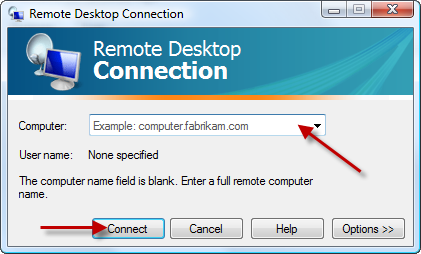
after running this software you will see the following window , enter the IP or host name of your VPS into the computer filed and click on Connect.

after a few seconds a new windows will be opened and you will be asked for the username and password , enter the username and password which is provided by your windows VPS provider. usually the username is Administrator.
if you enter the login details successfully , the desktop of windows VPS will be shown to you.

After you are logged into VPS , follow the below instructions :

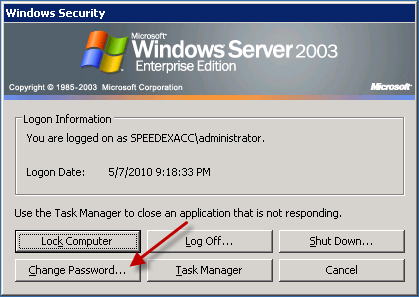
Press CTRL+ALT+END buttons simultaneously , the following menu will appear :

Click on Change Password :

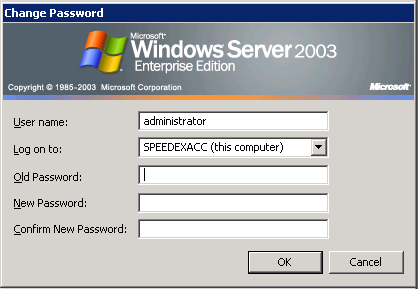
Fill the fields and click on OK.

Done :)

June 7, 2009

Change Linux Password from PHP Script

Filed under: CentOS,Debian,General,PHP — Tags: , , , — admin @ 8:48 pm

There are a few scripts available on net which allow you to change a linux user password from PHP. but all of them are very complex and hard to implement , so after some hours of work , I’ve written this PHP script :) it is very simple , in order for this to work you need to allow your webserver to run sed command as root through sudoers , or allow your webserver to write on your /etc/shadow file.

$username='USERNAME';
$password='PASSWORD';  // New Password
$sed='/bin/sed'; //Path to sed command
$salt = substr($username, 0, 2);
$pass_crypt = crypt($password, $salt);
$pass_crypt=str_replace("/","\/",$pass_crypt);
system($sed." -i 's/".$username.":[a-zA-z0-9/$\.]*/".$username.":".$pass_crypt."/g' /etc/shadow",$retval);

June 2, 2009

MySQL Change root password

Filed under: General,MySQL — Tags: , , , — admin @ 8:58 am

If you have never set a root password for MySQL, the server does not require a password at all for connecting as root. To setup root password for first time, use mysqladmin command at shell prompt as follows:

mysqladmin -u root password NEWPASSWORD

However, if you want to change (or update) a root password, then you need to use following command

mysqladmin -u root -p'oldpassword' password newpass

For example, If old password is abc, and set new password to 123456, enter:

mysqladmin -u root -p'abc' password '123456'

Powered by WordPress