Edited 2 April 2011
Where to get a suitable Windows VPS for Forex Traders ?
This questions has been asked many times from me , so I am going to explain whats behind the scene of windows VPS hosting so you can have a better view of it.
First we should know what we need for forex hosting , do we need a lot of space ? a lot of ram ? a lot of traffic ? the answer is NO , we need very high network uptime and VPS stability , so it is very different from VPS’s which are used for hosting purposes , a crash on a website hosting VPS may result on several minutes of downtime which may not be very important , but on a forex VPS can cause thousands of dollars of loss or interruption in EA work which is important for sure.
Currently there are several virtualization technologies , but most used are two :
- Virtuozzo by Parallels Company : 95% of windows VPS’s on market use this technology , it is a software layer virtualization , resources are not dedicated and overall I dont recommend it for Forex Hosting , but you may ask so why many hosting companies use this technology. the reason is that it makes more money for them , as the resources are not dedicated in virtuozzo , hosting companies can oversell the server. for example they get a server with 8GB of ram and can sell 100 VPS’s on it with a total of 32GB of Ram ! honestly I dont like the technologies which allow companies to cheat on people , These companies use virtuozzo and I suggest to avoid them for forex hosting : ForexVPS.com – CommercialNetworkServices.com (CNS) – SWVPS.com – VPSLand.com and many many more.
- Hyper-V by Microsoft : This technology is new and was introduced in Windows Server 2008 , it is a hardware layer virtualization , resources are dedicated and very stable. it is very very close to a dedicated server. so it is highly recommended it for forex VPS hosting. using this technology hosting companies can not cheat on people so it’s more expensive than virtuozzo. it is a real deal !
The company which I recommend for forex VPS hosting is BBVPS.com , they have a very solid network and they use Hyper-V technology and very good supprt. they are my choice for forex vps hosting 🙂
How to connect to your windows VPS :
In order to connect to a windows VPS remotely , you need to use a software named “Remote Desktop Connection” which is bundled with all versions of windows.
under windows XP it is located under : All Programs –> Accessories –> Communications
under windows Vista it is located under : All Programs –> Accessories
after running this software you will see the following window , enter the IP or host name of your VPS into the computer filed and click on Connect.
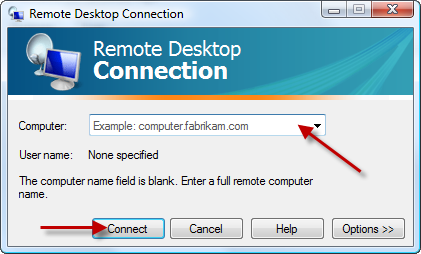
after a few seconds a new windows will be opened and you will be asked for the username and password , enter the username and password which is provided by your windows VPS provider. usually the username is Administrator.
if you enter the login details successfully , the desktop of windows VPS will be shown to you.
in order to install any software like Meta Trader or any other trading stations , it is exactly like how you install them on your home PC , you can run internet explorer on your VPS , download the software you need and install and use it.
Disable Automatic Updates :
Automatic Updates may restart your VPS automatically and close your running trading platforms. so for a trading station it is wise to disable automatic updates.
in order to disable automatic updates on windows 2003 :
Right click on My Computer -> Properties -> Automatic Updates -> Choose OFF -> Click on OK
Change Your VPS Password :
Read this article : How to change windows 2003 password
How to transfer files from home PC to windows VPS :
The best solution is using Dropbox, using it is very simple and their own website has a comprehensive guide on how to use it. It has many features, so I am not going to dig into the details.The idea is that you install Dropbox software on your home computer and Windows VPS. It will create a folder called Dropbox. What you copy inside the Dropbox on your home computer will be copied into the Dropbox on your VPS automatically and vice versa. Create a free 2GB account and receive an extra 500MB bonus cloud storage using this link :
Create a free account : Dropbox Free Account
How to install several MT4 instances of same broker on your VPS :
most of users want to install several instances of MT4 on their VPS. if MT4s are from different brokers , there would be no conflict. they will install in different folders and by different shurtcut names. but if you want to install several instances of MT4 from one broker then you should :
1.Rename the MT4 shortcut on your desktop to something else.
2.Run MT4 installer , but when it asks where to install the new MT4 , choose a different folder. you can add a number to end of folder name.
3.Complete the installation.
The above procedure installs another MT4 from same broker on your VPS with a separate shortcut on your VPS desktop.
Make Sure only one session is running :
one of the common problems of traders is that most of them are not familiar with remote desktop multi session functionality.
remote desktop allows to connect to windows VPS in different sessions , in other words you can have several ( generally 2 ) independent desktops.
so for example if you run a trading station on session one and before closing it you login to VPS again using remote desktop connection , a new desktop will be opened for you which wont show your running programs in session one. most traders may think their VPS is restarted or/and their platform is closed while in fact it is running in other session.
therefore it is very important to always make sure you run only one session or if you want to run more , you have to know what you do exactly.
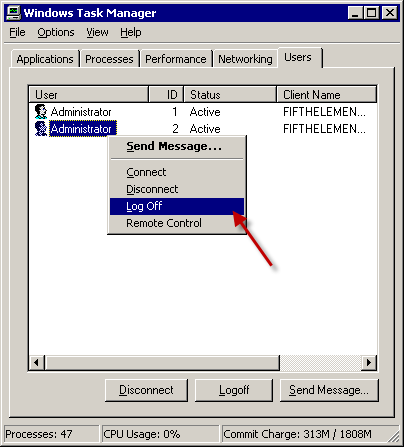
in order to determine how many sessions are running on your VPS , enter your windows task manager ( Start -> Run -> type “taskmgr.exe” and enter ) and then go to users tab , there you can see the logged in users on your VPS. if there is more than one there. it means there is two or more sessions are running.
you can simply connect to or logoff the extra sessions by right clicking on them and choosing the proper option.
How to Exit from VPS ?
after you have your softwares running on your VPS , do not shutdown or logoff from your VPS. it will cause your programs to be closed.
simply click on the [x] button of the VPS desktop button and click OK on the next confirmation window.
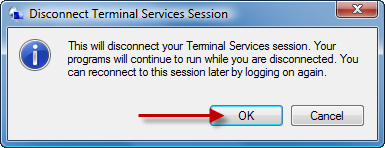
the next time you connect to your VPS , you can see your programs are still running there.
good,… Thanks for your Information
Comment by Wiwit anandriani — October 6, 2012 @ 6:24 pm
Its a easy to exit or disconnect from RDP but main problem is sound and unexpected shutdown of Forexvps
Comment by Kunnusingh18 — November 16, 2012 @ 9:10 am
?????????????????????????2000???
Comment by ??? — May 10, 2013 @ 9:15 pm
???????????????????????????????????????????????????????????????vps?????MT4????????????????????????MT4?????????????????????????????????,??????????,?????????????????????????????????????????????????????????????,??????????????????????????????????????????????????????????????????????????????????????????????????????,????????????????????????????????????????????????????????????????????????????????????????????????????????????????????????????????????????????????????????????????????????????????????????????????????????????????
Comment by Wendynewlife — May 11, 2013 @ 2:34 am
PRIVET YA SHUHRAT
Comment by SHUHRAT — September 10, 2014 @ 2:21 pm
GOOD
Comment by wan zamzuari wan mukhtar — November 18, 2016 @ 9:02 pm